
Stop Guessing and Start Tracking Your Apple Pay Expenses
Why Every Apple Pay User Needs a Budget App
The best apple pay budget app automatically tracks what you spend every time you tap to pay — no spreadsheets, no manual logging, no guesswork.
Here are the top types of options available right now (April 2026):
| App Type | Apple Pay Integration | Best For | Starting Price |
|---|---|---|---|
| Automated Sync | Automatic tap-to-pay tracking | Hands-free tracking | Free / Premium |
| Privacy-First | Apple Card, Cash & Savings via Apple Wallet | Privacy-first users | Free |
| Family Sharing | Apple Card & Cash via FinanceKit | Families & couples | Subscription |
| Power User | Apple Pay automation + Shortcuts | Deep iOS integration | Free |
| Manual Entry | Manual entry (no Apple Pay sync) | Mindful budgeters | Free / Lifetime |
You tap your phone to pay for coffee. Then lunch. Then a subscription renews. By the end of the month, you have no idea where your money went — just a vague sense that it left faster than it arrived.
That’s the problem most busy people face. Not lack of income. Lack of visibility.
Apple Pay makes paying effortless. But effortless spending without tracking is exactly how budgets fall apart.
The good news: a new category of iOS budgeting apps can now read your Apple Pay transaction data directly — pulling in the merchant name, amount, location, date, and category the moment you pay. Modern budgeting tools do this automatically using Apple’s FinanceKit framework, which lets approved apps access Apple Card, Apple Cash, and Apple Savings data without ever touching your bank credentials.
You pay. The app logs it. You stay on budget.
This guide covers the best apps for the job, how they compare, and how to pick the right one for your life.
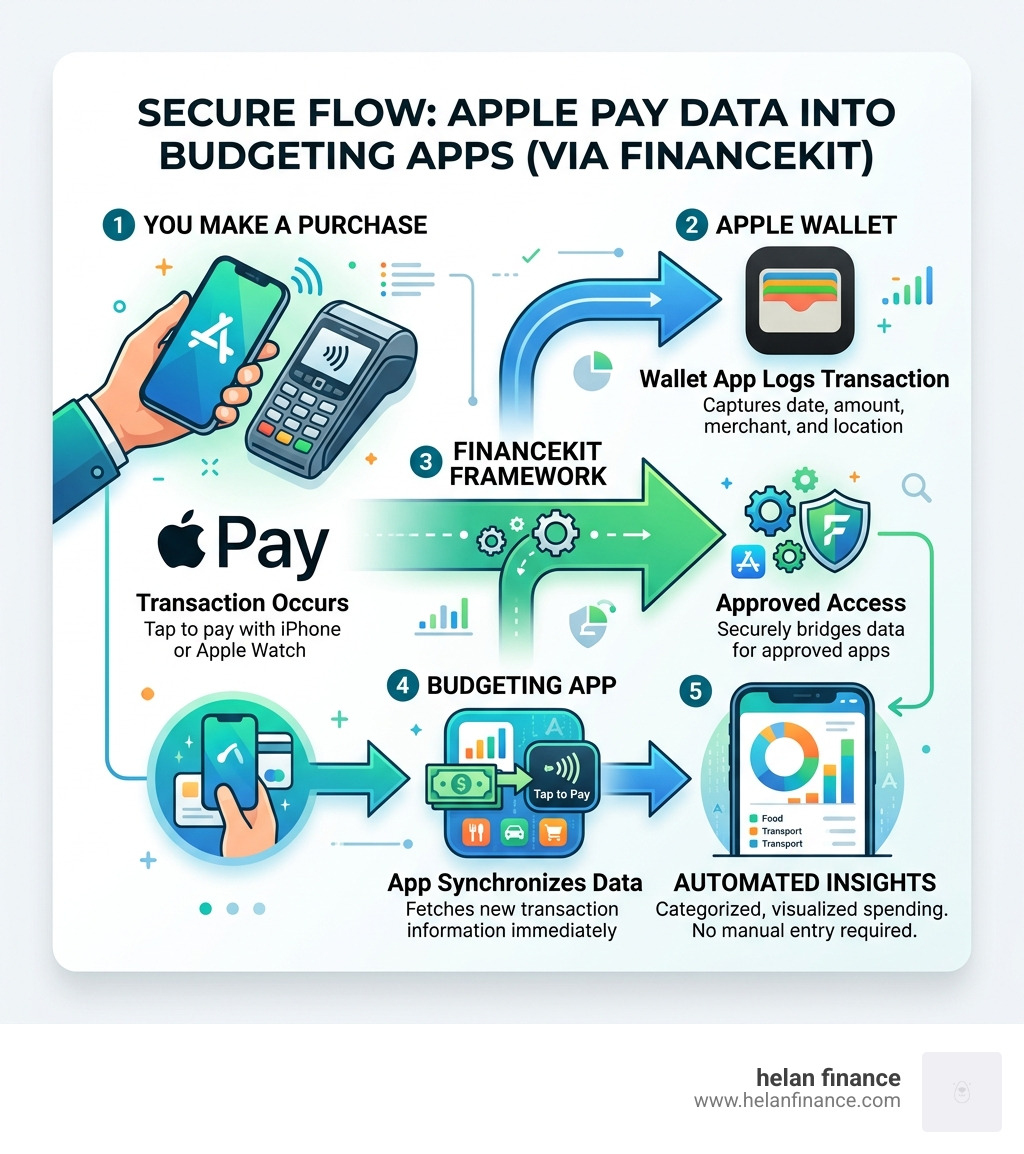
How an Apple Pay Budget App Automates Your Finances
In the past, budgeting meant collecting paper receipts or logging into a bank portal to export CSV files. Today, the apple pay budget app ecosystem has evolved into a real-time financial assistant. By leveraging Apple’s native frameworks, these apps bridge the gap between your digital wallet and your financial goals.
The magic happens through FinanceKit. Introduced by Apple to allow developers to securely access financial data, this framework enables apps to “see” your transactions across the Apple ecosystem. This includes your Apple Card, Apple Cash, and even your Apple Savings account. When you use tap-to-pay at a grocery store, the transaction doesn’t just sit in your Wallet app; it flows into your chosen budget app instantly.
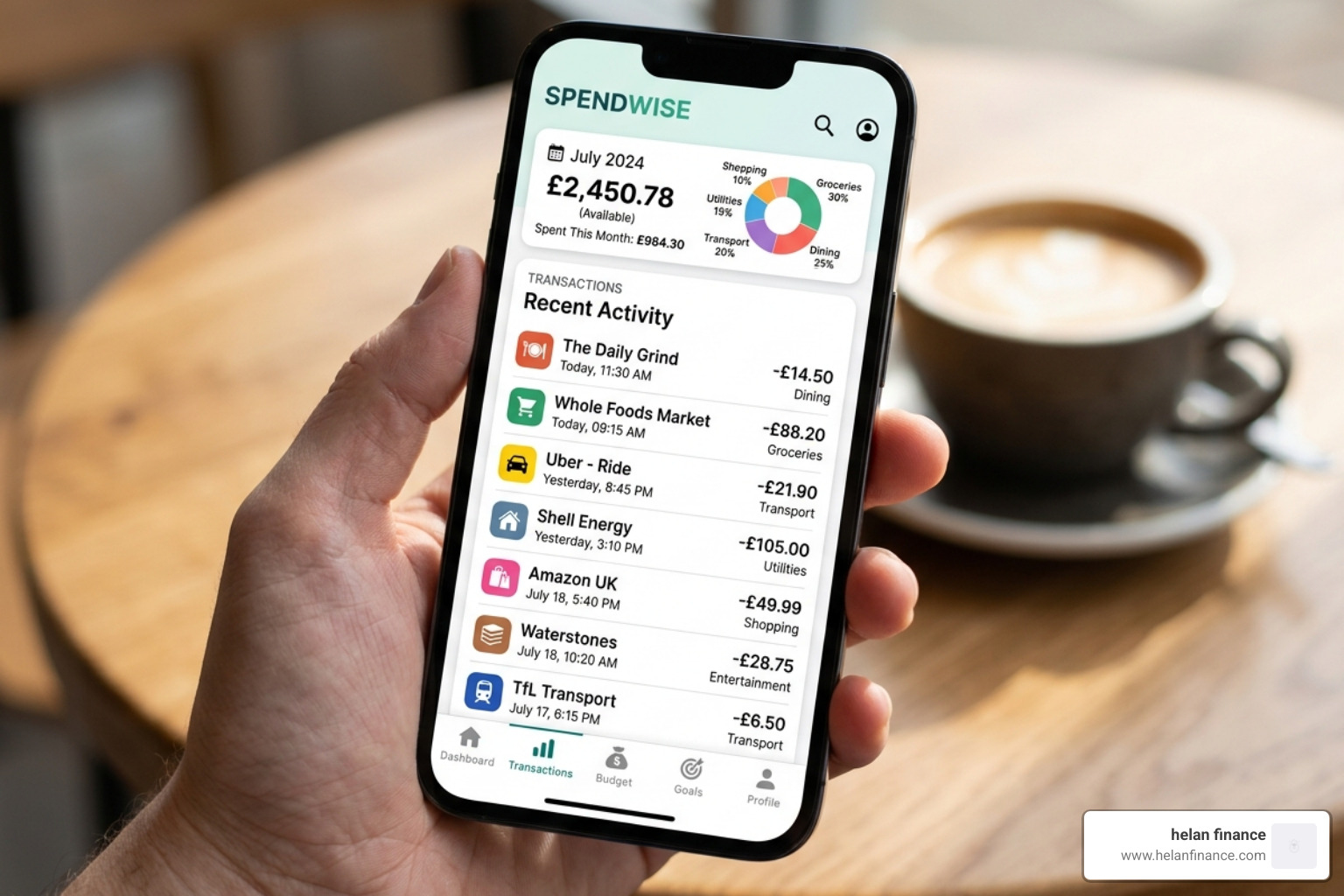
Automatic tracking eliminates the “memory tax” of budgeting. Specialized automated apps are designed specifically for this, capturing the merchant name, exact amount, geographical location, and date. Because these apps use AI-driven categorization, a purchase at a gas station is automatically tagged as “Transport,” while a tap at a cafe goes to “Dining.”
Setting Up Your First Apple Pay Budget App
Getting started is surprisingly simple, provided you are running a modern version of iOS (ideally iOS 17.4 or later, or the current iOS 18.5). Here is how we recommend setting things up:
- Grant Permissions: Upon first launch, the app will ask for permission to access your Apple Wallet data. This is a secure handshake; you aren’t giving the app your credit card number, just permission to read the transaction history.
- Account Linking: If you use an Apple Card or Apple Cash, you’ll link these via the FinanceKit prompt. For other bank cards used within Apple Pay, some apps may require a secondary link via a service like Plaid, though many now specialize in reading the “tap” data directly.
- Initial Sync: The app will pull in your recent history. Don’t be alarmed if your initial categories look a bit messy; the “learning” phase usually takes about a week of active spending.
- Define Your “Why”: Most apps will ask you to set a monthly limit. Instead of guessing, look at the synced history to see what you actually spent last month.
Analyzing Spending Trends with an Apple Pay Budget App
Once your data is flowing, the real value of an apple pay budget app becomes clear. You move from “What did I spend?” to “Why am I spending this much?”
Advanced tracking tools offer deep insights into merchant patterns. For example, you might realize that while your “Grocery” budget is fine, your “Small Taps” (those $5 to $10 coffee and snack purchases) add up to $300 a month. By viewing category breakdowns and monthly comparisons, you can identify “lifestyle creep” before it drains your savings.
Proactive alerts are another game-changer. Rather than checking your balance and feeling guilty, these apps send notifications like, “You’ve spent 80% of your dining budget, but there are 10 days left in the month.” This real-time feedback loop is only possible because of the instant nature of Apple Pay sync.
Key Features of the Best Apple Pay Budget App
When choosing an app, you need to decide between a “set it and forget it” automated tool or a manual “mindfulness” tool. Here is how the top features stack up:
| Feature | Automated Sync | Manual Entry |
|---|---|---|
| Data Entry | Instant via FinanceKit | User must type every expense |
| Accuracy | 100% (pulls from bank data) | High (if the user remembers) |
| Privacy | Shared via Apple Frameworks | 100% local on-device |
| Effort | Low (Zero-effort logging) | High (requires discipline) |
| Psychological Impact | Passive awareness | Active spending mindfulness |
Beyond the data entry method, the best apps offer deep integration with the iOS ecosystem. This includes Home Screen Widgets that show your “Safe to Spend” amount at a glance, Dark Mode for late-night budget reviews, and iCloud Sync so your data stays consistent across your iPhone, iPad, and Mac.
Shared Budgeting for Families
If you aren’t the only one spending in your household, you need an app that supports collaboration. Collaborative budgeting tools are leaders here. They allow for “Workspaces” where multiple users can see the same budget.
Using Apple’s Family Sharing and iCloud encryption, these apps ensure that while you and your partner can both see that the “Rent” envelope is full, your data remains private from the app developers themselves. Role-based permissions are also useful for teaching teenagers how to manage their Apple Cash allowances without giving them full access to the primary household accounts.
Advanced Financial Tools and Projections
The most sophisticated apps go beyond simple tracking. They act as financial coaches.
- Safe-to-Spend: Advanced tools calculate a single “honest number.” It looks at your bank balance, subtracts upcoming bills and your savings goal, and tells you exactly what you can spend right now without ruining your month.
- Monte Carlo Simulations: Some sophisticated apps use these complex mathematical models to project your net worth into the future, helping you see if you’re on track for retirement.
- Receipt OCR: If you still deal with cash occasionally, many modern apps let you snap a photo of a receipt. The AI reads the text and logs the transaction for you.
Privacy and Data Security in Modern Budgeting
We understand that sharing financial data feels risky. However, the current generation of apple pay budget app options is built with a “Privacy First” mentality.
Many modern apps utilize on-device storage. This means your transaction history never leaves your iPhone. It isn’t stored on a company server or sold to advertisers. When sync is required across devices, it happens via iCloud with end-to-end encryption, meaning only you hold the keys to your data.
For apps that do connect to external banks, Plaid is the industry standard. It uses bank-grade security to create a read-only “tunnel” to your data. The app can see your transactions, but it can never move your money or see your login credentials. Always look for apps that carry certifications like eTrust or specifically state a “no-log” policy in their App Store privacy labels.
Manual Entry vs. Automatic Sync: Choosing Your Style
There is a heated debate in the personal finance world: is it better to automate everything or log it yourself?
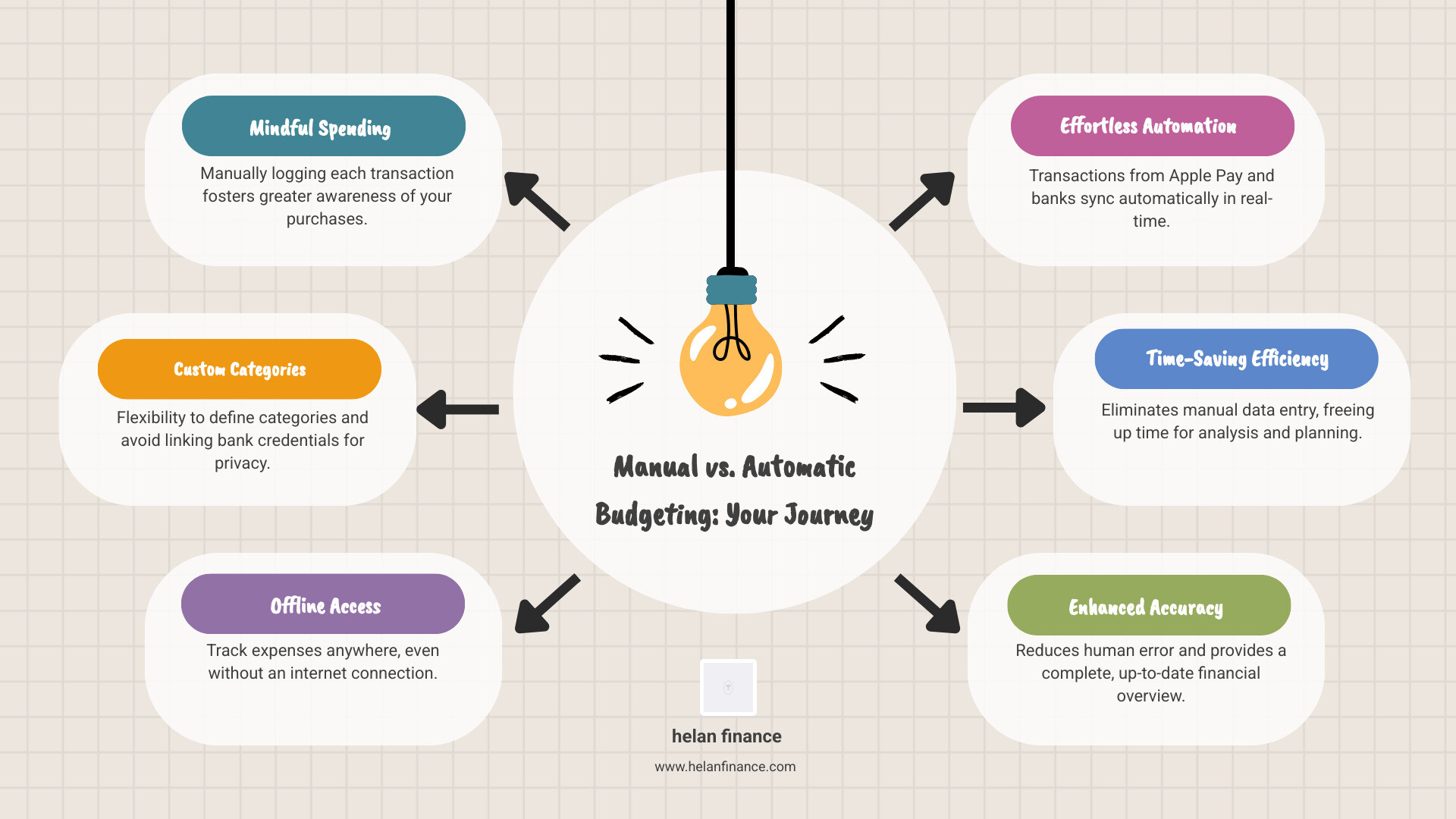
The Benefits of Manual Tracking
Proponents of manual entry argue that it is actually better for your brain. When you have to physically type in “Lunch – $22.50,” you feel the “pain” of the purchase. This fosters a higher level of money awareness. Manual apps are also perfect for users with variable income or those who don’t want to link their bank accounts for privacy reasons. They offer:
- Customization: You aren’t limited by how a bank categorizes a merchant.
- Offline Access: Log a purchase in the middle of the woods if you want to.
- Mindfulness: It turns spending into a conscious choice rather than an invisible tap.
The Efficiency of Automatic Apple Pay Tracking
On the other side, automated tracking tools cater to the busy professional. If you make 50+ transactions a week, manual entry is a recipe for failure—you will eventually miss a day, get overwhelmed, and quit budgeting altogether.
Automatic tracking provides:
- Zero-Effort Logging: Your budget is always up to date, even if you don’t open the app for a week.
- Merchant Accuracy: No more wondering “What was that $14.02 charge at ‘SQ *Merchant’?” The app identifies it for you.
- Fraud Detection: Because the sync is real-time, you’ll notice an unauthorized transaction immediately, often before your bank sends an alert.
Frequently Asked Questions about Apple Pay Budgeting
Does Apple Pay automatically track my budget?
Apple Pay itself provides a list of recent transactions in the Wallet app, but it does not offer “budgeting” in the traditional sense. It won’t tell you if you’ve spent too much on groceries or help you save for a vacation. To get those insights, you need to connect your Apple Pay data to a dedicated apple pay budget app like those mentioned in this guide.
Are Apple Pay budget apps safe to use?
Yes, provided you choose apps that use Apple’s official FinanceKit or Plaid for connections. These technologies ensure the app never sees your actual credit card number or bank password. Look for apps that emphasize “on-device processing” and “iCloud encryption” for the highest level of security.
Can I track Apple Card and Apple Cash transactions?
Absolutely. In fact, Apple Card and Apple Cash are the easiest to track because they integrate directly with the iOS system. Specialized apps are specifically designed to pull this data automatically, providing a seamless view of your “Daily Cash” rewards and spending.
Conclusion
The era of “guessing” where your money went is over. By choosing the right apple pay budget app, you turn your iPhone from a spending machine into a powerful financial tool. Whether you prefer the automated efficiency of sync-based tools or the mindful, aesthetic approach of manual entry, the goal is the same: clarity.
At Helan Finance, we believe that financial health is a pillar of overall wellness. Just like a fitness tracker helps you stay active, a budget app helps you stay financially fit. By building a routine around your spending data, you can reduce stress, eliminate debt, and finally start saying “yes” to the things that truly matter.
Ready to take control? Start by downloading a budgeting tool and letting it run for one week. You might be surprised at what your data tells you.
Start your journey to financial clarity with Helan Finance
External Resources:
- Apple Support: See your Apple Pay transaction history
- Apple Card: How to view your spending
- Consumer Financial Protection Bureau: Budgeting basics

