
10 Insanely Simple Budget Template Tricks
Why a Budget Template Is the Fastest Way to Take Control of Your Money
A budget template is a pre-designed framework that organizes your income, expenses, and savings into one clear structure — so you always know where your money is going.
Quick answer: What is a budget template and where can you get one?
| What you need | Where to find it |
|---|---|
| Free spreadsheet template | Google Sheets, Microsoft Excel |
| Visual/printable template | Canva (15,979+ options) |
| Simple PDF worksheet | Consumer.gov |
| 50/30/20 rule template | NerdWallet, Smartsheet |
Most people skip budgeting not because they don’t care — but because it feels complicated and time-consuming. A good template removes that friction completely.
Think of it as a roadmap for your finances. It shows you exactly what’s coming in, what’s going out, and whether you’re moving toward your goals or away from them.
The good news? You don’t need to build one from scratch. You just need the right template and a few smart tricks to make it work for your life.
That’s exactly what this guide covers.
1. Select a Proven Budgeting Method
Before you even open a spreadsheet, you need a strategy. A budget template is just a tool; the method you choose is the engine that drives it. If you pick a method that clashes with your personality, you’ll likely abandon it by the second week of the month.
We’ve found that the most successful budgeters use one of three core frameworks to organize their cash flow.

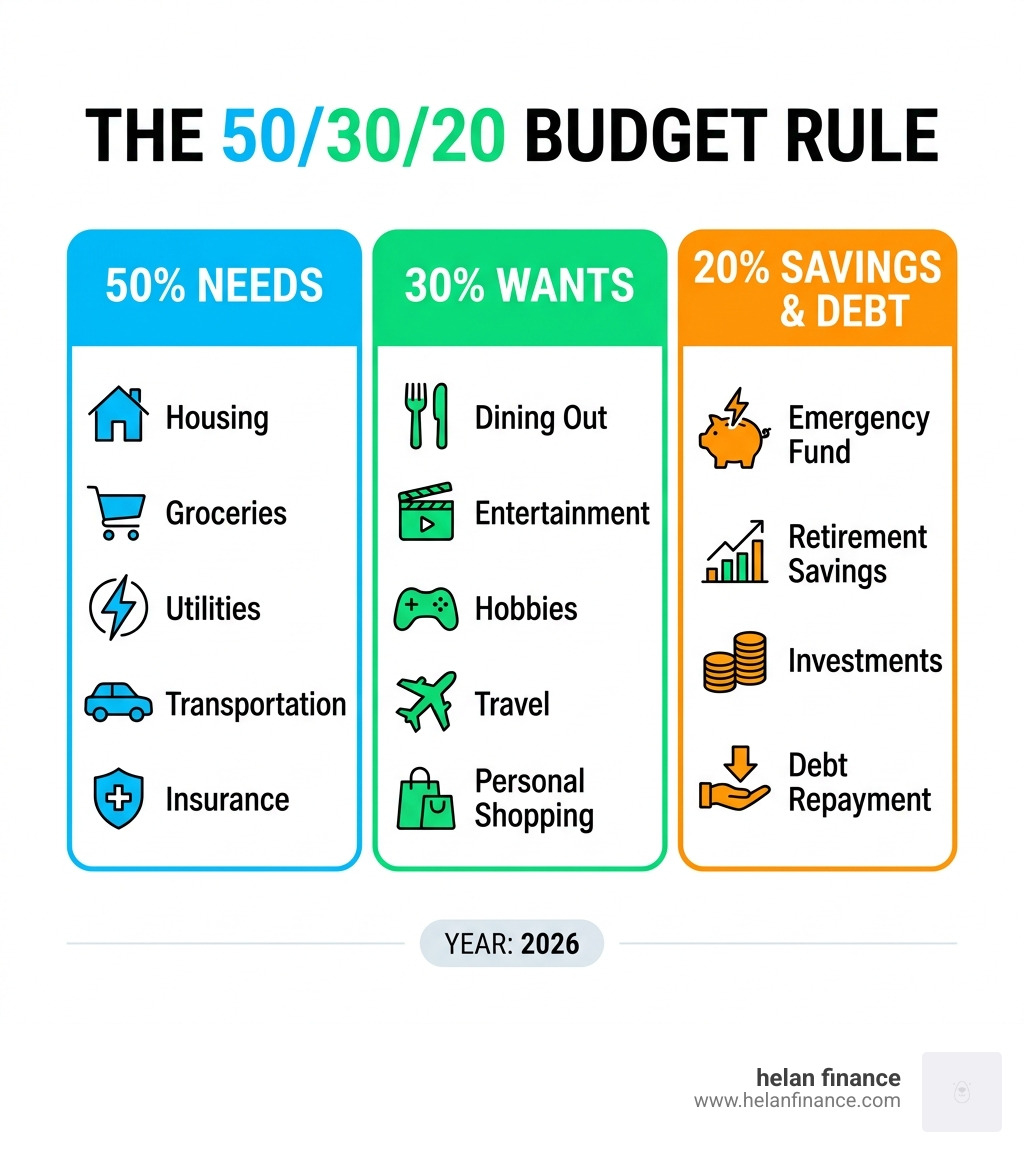
Trick 1: The 50/30/20 Framework
This is the “Goldilocks” of budgeting—not too restrictive, not too loose. It’s perfect for beginners using a budget template for the first time.
- 50% for Needs: This covers the non-negotiables like rent, groceries, utilities, and insurance.
- 30% for Wants: This is your “fun money”—dining out, Netflix, or that new pair of shoes.
- 20% for Savings and Debt: This goes toward your emergency fund, retirement, or paying down credit card balances.
Trick 2: Zero-Based Allocation
If you want total control, this is your trick. In a Zero-Based Monthly Budget Template – Google Drive, every single dollar is assigned a job. Your income minus your expenses (including savings transfers) should equal exactly zero at the end of the month. It ensures that no money “slips through the cracks” into mindless scrolling-induced purchases.
Trick 3: The 70/20/10 Debt Strategy
If you are focused on aggressive debt repayment or wealth building, you might prefer a different split.
- 70% for Living Expenses: All needs and wants must fit here.
- 20% for Debt/Savings: High-priority financial goals.
- 10% for Fun: A small “safety valve” to prevent burnout.
Comparison of Allocation Rules:
| Rule | Living/Needs | Debt/Savings | Wants/Fun |
|---|---|---|---|
| 50/30/20 | 50% | 20% | 30% |
| 70/20/10 | 70% | 20% | 10% |
| 75/15/10 | 75% | 25% (Combined) | Included in 75% |
2. Gather Your Financial Data First
One of the biggest mistakes we see is people trying to fill out a budget template from memory. Spoiler alert: our brains are terrible at remembering how much we actually spend on coffee or “random Amazon stuff.”
Before you start, gather your “financial ingredients.” You’ll need your bank statements, credit card bills, and pay stubs from the last 30 days.

Trick 4: Accurate Income Assessment
Don’t just list your annual salary divided by 12. You need your take-home pay—the actual amount that hits your bank account after taxes and 401k contributions.
Be sure to include:
- Primary Salary: Your main paycheck.
- Side Hustles: Freelance work or gig economy income.
- Passive Income: Investment dividends or rental income.
- Variable Income: If you’re a freelancer, use a conservative estimate based on your lowest-earning month of the last year.
To make this easier, you can use a simple [PDF] Make a Budget – Consumer.gov to jot down these numbers before transferring them to a digital tool.
3. Customize Your Monthly Budget Template
A generic budget template is a great start, but it won’t work long-term unless it looks like your life. Did you know that roughly 27% of Americans believe they don’t even need a budget? Many of them feel this way because they tried a rigid system that didn’t fit their specific habits.
Customization is the secret to sticking with it. When your budget reflects your reality, it becomes a tool for empowerment rather than a source of guilt.
Trick 5: Categorize Fixed vs. Variable Costs
Your budget template should clearly distinguish between these two:
- Fixed Expenses: These stay the same every month (rent, car payments, insurance). They are easy to predict.
- Variable Costs: These fluctuate (groceries, gas, utility bills, entertainment). This is where most people overspend.
By separating them, you can see exactly where you have “wiggle room” to cut back if things get tight.
Trick 6: Treat Credit Cards Like Cash
This is a pro-level trick for your budget template. Instead of waiting for your credit card bill to arrive at the end of the month, record your credit card purchases in your “Actual” column as soon as they happen.
By treating credit card spending like cash, you can still reap the rewards points and cash back without the risk of overspending. If you spend $50 on gas on your card, deduct $50 from your “Gas” category immediately.
Trick 7: Automate “Difference” Calculations
The most powerful part of a digital budget template is the “Difference” column. This subtracts your “Actual” spending from your “Planned” spending.
- Pro Tip: Use conditional formatting. Set your spreadsheet to turn the cell RED if the number is negative (meaning you overspent). This creates an instant visual alert that tells you to slow down in that category for the rest of the month.
Trick 8: Prioritize Savings “Buckets”
Don’t just have one “Savings” line. Break it down into “buckets” within your budget template:
- Emergency Fund: Your financial safety net.
- Retirement: 401k or IRA contributions.
- Specific Goals: Saving for a summer vacation or a down payment on a house.
- Education: Saving for a degree or your children’s future.
By naming these buckets, you’re less likely to “borrow” from them for temporary wants.
4. Where to Find the Best Free Budget Template
You don’t need to be a math whiz to have a beautiful, functional budget. There are thousands of resources available in April 2026 that do the heavy lifting for you.
Trick 9: Leverage Visual Templates
If spreadsheets make your eyes glaze over, go visual. Free and customizable budget templates – Canva offers over 15,979 templates that range from minimalist professional designs to “Retro Y2K” planners. These are great if you prefer to print your budget and hang it on the fridge or use it in a digital notebook.
If you prefer the power of formulas, you can find Free budget template spreadsheets to customize | Microsoft Excel that come pre-loaded with all the math you need. Google Sheets also offers “Personal Budget” and “Monthly Budget” templates directly in their template gallery.
Trick 10: Duplicate and Adjust Monthly
Your budget shouldn’t be a static document. Every month is different—December has holiday gifts, August has back-to-school costs, and April 2026 might have tax payments or a spring vacation.
At the end of each month, duplicate your tab. Use the “Actual” data from the previous month to make your “Planned” numbers for the next month more accurate. This historical data is the best way to spot spending patterns and adjust your lifestyle to meet your long-term goals.
5. Frequently Asked Questions about Budgeting
What is a budget template?
A budget template is a pre-designed framework or spreadsheet that helps you organize your financial information systematically. It provides a structured place to track your income, expenses, and savings goals so you don’t have to start from scratch.
How do I create a monthly budget template?
First, choose a platform (Excel, Google Sheets, or a printable PDF). Next, list all your income sources. Then, categorize your expenses into “Needs” and “Wants.” Set realistic limits for each category based on your past spending. Finally, track your actual spending throughout the month and compare it to your plan.
Does Google have a budget template?
Yes! Google Sheets has several built-in options. You can access them by going to Google Sheets and selecting the “Template Gallery” at the top. Their “Monthly Budget” template is particularly popular because it includes automated charts and pivot tables that visualize your spending for you.
Conclusion
Taking control of your money doesn’t have to feel like a chore. By using a budget template and applying these ten simple tricks, you can turn financial planning into a routine that brings you peace of mind rather than stress.
The goal isn’t perfection; it’s progress. Even if you overspend in one category this month, having the data allows you to adjust and win next month. At Helan Finance, we believe that simplified tools are the key to building a healthy financial life.
Ready to start your journey toward effortless money management? Use these resources, pick a template that speaks to you, and watch how quickly your financial “roadmap” leads you to your goals.
Start your simplified financial journey

