
Track Your Rainy Day Fund with These Free Spreadsheet Templates
The Quickest Way to Find a Free Emergency Fund Spreadsheet in 2026
An emergency fund spreadsheet free download is easier to find than most people think. Here are the best places to grab one right now:
- Spreadsheet software template galleries – Many spreadsheet platforms include free budget and savings tracker templates you can customize for an emergency fund.
- Helan Finance – We offer specialized budget worksheets and calculation guides designed to simplify your savings journey.
- Community Forums – Many personal finance communities share open-source templates for tracking rainy day funds.
- Local Library Resources – Many libraries provide access to financial literacy software and downloadable templates for their patrons.
- Build Your Own – With a simple savings tracker layout and a few formulas, you can create a personalized emergency fund sheet in minutes.
Life has a habit of sending expensive surprises – a job loss, a broken-down car, an unexpected medical bill. Without a financial cushion, these moments don’t just cause stress. They can push you into debt fast.
That’s exactly why financial experts consistently recommend keeping three to six months of living expenses saved and ready to access. The challenge? Most people either don’t know their target number or have no simple way to track their progress toward it.
That’s where a free emergency fund spreadsheet comes in.
You don’t need a financial advisor or a paid app. A well-built spreadsheet – one you can download in minutes – can calculate your savings target, track every deposit, and show you exactly how close you are to your goal. Whether you prefer a cloud-based sheet on your phone or a downloadable file on your desktop, there’s a free option that fits your life.
This guide rounds up the best free template sources available in April 2026, so you can stop guessing and start building.
What is an Emergency Fund and Why is it Essential?
At Helan Finance, we like to think of an emergency fund as your “financial shock absorber.” It is a dedicated pool of cash set aside specifically for life’s “what if” moments. Unlike a vacation fund or a down payment for a house, this money serves one purpose: to protect you when the unexpected happens.
In April 2026, with the cost of living remaining a top priority for most households, having a liquid safety net is more essential than ever. According to the Consumer Financial Protection Bureau, building an emergency savings buffer is one of the foundational steps toward long-term financial health. Here is why we believe every person needs one:
- Debt Prevention: When your water heater explodes or your car needs a new transmission, you have two choices: pay with cash or swipe a credit card. An emergency fund ensures you don’t fall into a high-interest debt trap during an already stressful time.
- Job Loss Protection: No matter how stable your industry feels, layoffs can happen. Having months of expenses saved buys you time to find the right next job, rather than the first one that pays.
- Peace of Mind: There is a psychological weight to living paycheck to paycheck. Knowing you have a “rainy day” fund allows you to sleep better at night.
- Liquidity: An emergency fund must be liquid, meaning you can get to the cash immediately. This isn’t money tied up in stocks or real estate; it’s money in a high-yield savings account.
For a deeper dive into how to structure your overall savings journey, check out our Beginners Guide To Savings Plans. Understanding your cash flow management is the first step toward true financial stability.

How to Calculate Your Target Using an Emergency Fund Spreadsheet Free
One of the most common questions we hear is: “How much is enough?” While the standard advice is three to six months of expenses, your specific number depends on your lifestyle, risk tolerance, and household structure.
Using an emergency fund spreadsheet free tool allows you to plug in your actual costs to see a personalized target. Here is how we recommend calculating your goal:
- List Essential Expenses: Focus on your “needs,” not “wants.” This includes housing (rent/mortgage), utilities, groceries, transportation, insurance, and minimum debt payments.
- Determine Your Coverage Period:
- 3 Months: Best for single people with stable jobs and low expenses.
- 6 Months: The gold standard for families or those with moderate income volatility.
- 9-12 Months: Recommended for freelancers, business owners, or those in highly specialized industries where finding a new job takes longer.
- Factor in Risk: Do you have a high deductible on your health insurance? Do you own an older home? If so, you might want to pad your total.
To get started with the math, you can use an A Z Guide To Savings Calculator to visualize how small monthly contributions can lead to a fully funded safety net.
Savings Target Comparison Table (Sample Monthly Expenses)
| Monthly Expenses | 3-Month Goal | 6-Month Goal | 12-Month Goal |
|---|---|---|---|
| $2,500 | $7,500 | $15,000 | $30,000 |
| $4,000 | $12,000 | $24,000 | $48,000 |
| $6,000 | $18,000 | $36,000 | $72,000 |
Key Features to Look for in a Savings Tracker
Not all spreadsheets are created equal. When you are browsing for an emergency fund spreadsheet free download, look for these essential features that make tracking easier and more effective:
- Expense Categorization: The sheet should allow you to break down costs so you can see exactly where your “survival” budget goes.
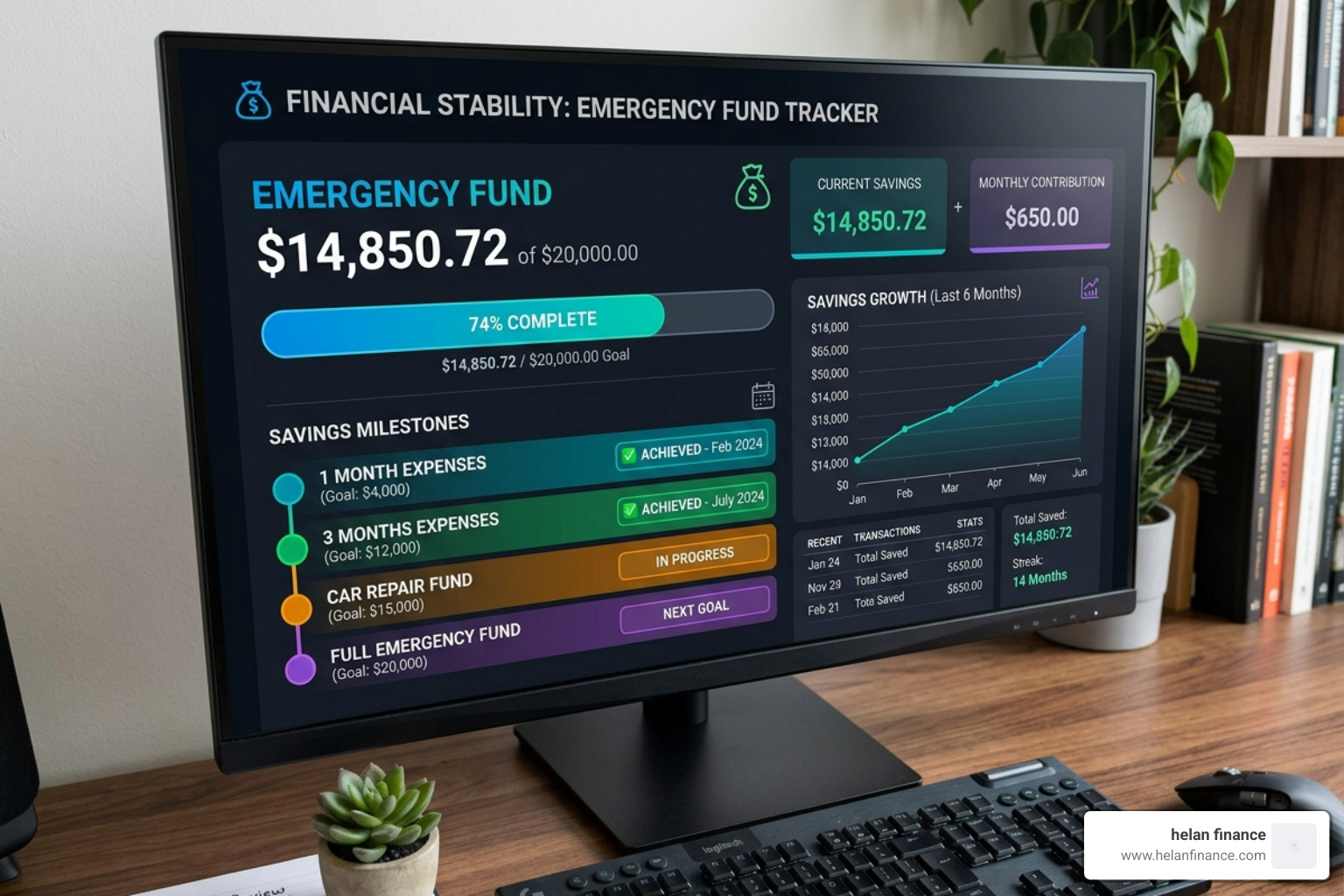
- Progress Visualization: We love a good progress bar! Seeing a visual representation of your fund hitting 25%, 50%, and 75% milestones is incredibly motivating.
- Automated Formulas: You shouldn’t have to be a math whiz. A good template will automatically calculate your remaining balance and estimated completion date based on your monthly contributions.
- Contribution Logs: A dedicated space to record every deposit—whether it’s a $500 tax refund or a $20 “leftover” from your grocery budget—helps you stay accountable.
- Milestone Indicators: Some advanced free templates even offer “celebration” alerts when you reach key goals.
If you want to build your own from scratch, we have a guide on how to build a budget calculation sheet that walks you through the logic of setting up these automated features.
Where to Find a Reliable Emergency Fund Spreadsheet Free Online
The internet is full of templates, but you want something trusted and secure. Here are our top recommendations for April 2026.
Finding the Best Emergency Fund Spreadsheet Free for Google Sheets
Google Sheets is our favorite for most users because it’s cloud-based. You can check your progress at the grocery store or update your log while sitting on the bus.
- Native Template Gallery: Google offers built-in budget and savings templates that can be customized for emergency funds in seconds.
- Mobile Accessibility: The Google Sheets app allows you to update your emergency fund tracker on the go, ensuring you never miss a contribution log.
- Helan Finance Cloud Tips: When using Google Sheets, you maintain full data ownership. Your file stays in your personal Google Drive, away from third-party app servers.
For a comprehensive tool that handles both your rainy day fund and your daily spending, our Bills And Expenses Spreadsheet is the ultimate companion.
Choosing an Emergency Fund Spreadsheet Free for Spreadsheet Software
If you prefer the power of desktop software, a downloadable spreadsheet file can be a great fit. It offers strong data visualization and can work offline depending on the program you use.
- Built-In Template Libraries: Many spreadsheet programs provide professionally designed budget trackers that include built-in formulas for savings goals.
- Offline Security: Storing your emergency fund spreadsheet locally on your hard drive provides an extra layer of privacy for those who prefer not to use cloud storage.
- Advanced Features: Downloadable spreadsheets are great if you want to use advanced sorting, charts, or long-term spending analysis.
To master the formulas that make these sheets work, read our guide on how to Excel Your Way To Wealth With The Savings Plan Formula.
Strategies to Pair with Your Emergency Fund Tracker
A spreadsheet is just a tool; you need a strategy to fill it. Here are the methods we recommend to our community:
- The 50/30/20 Rule: Allocate 50% of your income to needs, 30% to wants, and 20% to savings and debt payoff. If you are aggressively building an emergency fund, you might temporarily shift that to 60/20/20 or even 70/10/20.
- Zero-Based Budgeting: Give every dollar a job. If you have $100 left at the end of the month, its “job” is to go into the emergency fund.
- Automated Transfers: Don’t rely on willpower. Set your bank to automatically move a set amount to your savings account the day you get paid.
- High-Yield Savings Accounts (HYSA): Don’t let your emergency fund sit in a standard checking account earning 0.01% interest. Use The High Yields Savings Account Calculator to see how much more you could earn with a better interest rate.
Common Mistakes to Avoid When Tracking Your Savings
Even with the best emergency fund spreadsheet free template, there are a few pitfalls to watch out for:
- Underestimating Your “Survival” Budget: Many people forget to include quarterly or annual bills (like car registration or life insurance) when calculating their monthly needs.
- Mixing Funds: Your emergency fund should be in a separate account from your daily spending. If it’s all in one place, you’re more likely to “accidentally” spend it on a non-emergency.
- Neglecting Updates: Life changes. If you get a raise, have a child, or move to a new city, your emergency fund target needs to be recalculated.
- Ignoring Inflation: What $10,000 could buy three years ago is different from what it can buy in 2026. Review your target annually.
- Security Risks: Since your spreadsheet contains sensitive financial data, ensure your computer or Google account is password-protected and uses two-factor authentication.
For a simple starting point, download our Budget Worksheet Free Template to get your categories organized.
Frequently Asked Questions About Emergency Fund Tracking
How often should I review and update my spreadsheet?
We recommend a quick check-in once a month. This allows you to log your latest contribution and see your progress. Once a year, do a “deep dive” to ensure your target amount still reflects your current cost of living.
Is a digital spreadsheet better than a printable PDF tracker?
Digital spreadsheets are generally better because they do the math for you. However, some people find that a printable PDF tracker on the fridge provides a better visual reminder to stay on track. If you’re a beginner, start with a digital one to avoid calculation errors.
How do I protect my financial spreadsheet from security risks?
If you are using a cloud-based spreadsheet, enable Two-Factor Authentication (2FA) on your account. If you are using a desktop spreadsheet file, use the built-in password protection features available in your software. Never share your spreadsheet link with anyone unless they are a trusted household partner.
Conclusion
Building an emergency fund is one of the most significant steps you can take toward financial wellness. In April 2026, the tools to manage your money have never been more accessible. By using an emergency fund spreadsheet free of charge, you remove the barriers of cost and complexity.
At Helan Finance, we believe that financial planning should be simplified. It’s not about complex algorithms; it’s about routines, consistency, and having the right tools in your belt. Whether you choose a high-powered Excel workbook or a collaborative Google Sheet, the best time to start tracking is today.
Stop guessing about your future and start pressing toward your goals.
CTA: Start your financial health journey at Helan Finance

