
Stop Losing Money with a Simple Bill Tracker Spreadsheet
You’re Probably Losing Money Without a Bill Tracker Spreadsheet
A bill tracker spreadsheet is a simple tool that lists all your bills in one place — with due dates, amounts, and payment status — so nothing slips through the cracks.
Here are the best free options available right now:
| Template Type | Platform | Best For |
|---|---|---|
| Automated Bill Tracker | Google Sheets | Efficiency and speed |
| Simple Bill Organizer | Excel & PDF | Basic organization |
| Monthly Budget Template | Google Sheets | Visual charts and overviews |
| Bill Pay Schedule | Excel | Formula-based calculations |
| Multi-Bill Tracker | Google Sheets | Long-term 12-month views |
That’s the quick answer. But if you want to pick the right template and actually use it consistently, keep reading.
You know that feeling when a bill hits your account and you completely forgot it was coming? Or you tally up your subscriptions and realize you’re spending way more than you thought?
That’s not a spending problem. It’s a visibility problem.
Most busy people don’t track their bills in one place. They rely on memory, email reminders, or auto-pay — and then wonder where their money went at the end of the month. Late fees add up. Interest charges sneak in. And the stress of financial uncertainty quietly drains your energy.
A simple spreadsheet changes all of that. It gives you a clear picture of what you owe, when it’s due, and what you’ve already paid — without needing a fancy app or a financial advisor.
What is a Bill Tracker and Why Use One?
At its core, a bill tracker spreadsheet is a digital ledger designed to solve the “visibility problem” we all face. It is a centralized hub where every recurring payment, debt obligation, and subscription lives. While many people think they have their finances under control because they use auto-pay, relying solely on automation can lead to “financial drift”—where you stop noticing how much services cost or when rates increase.
Using a tracker provides several key benefits:
- Improved Cash Flow: By seeing exactly when money is leaving your account, you can align your bill payments with your paydays. This ensures you always have enough liquidity to cover your essentials.
- Late Fee Prevention: Even one missed payment can result in a $35 late fee and a hit to your credit score. A tracker acts as a secondary safety net.
- Interest Rate Awareness: Many advanced spreadsheets allow you to track interest rates. This is vital for prioritizing which debts to pay off first to save money in the long run.
- Historical Data: It’s helpful to look back and see how your utility bills fluctuate seasonally. This helps with Your Bills Are Calling And They Want A Calendar Template planning.
Understanding your Bill Payment Options Everything You Need To Know is the first step toward financial peace. When we take the time to manually log our expenses, we engage with our money in a way that automated apps simply don’t allow.
Key Features of an Effective Bill Tracker Spreadsheet
Not all spreadsheets are created equal. If you are building your own or looking for a template, here are the non-negotiables we recommend:

- Automated Calculations: You shouldn’t need a calculator. A good template uses formulas to sum up your total monthly obligations and tell you exactly how much “free” cash you have left.
- Payment Status Tracking: A simple “Paid/Unpaid” checkbox or dropdown menu is essential. There is a psychological “win” in marking a bill as paid that keeps you motivated.
- Due Date Alerts: Visual cues, like cells that turn red when a bill is past due or yellow when it’s approaching, are incredibly helpful.
- Recurring Bill Management: Most of our bills are the same every month. Your bill tracker spreadsheet should allow you to set these up once so you don’t have to re-type them every 30 days.
- Categorization: To truly manage your money, you need to know where it’s going. We suggest using 10 Essential Categories For Personal Expenses You Need To Track to organize your spending.
- Multi-Currency Support: For our friends who travel or live abroad, being able to track bills in different currencies without breaking the formulas is a huge plus.
A Bills And Expenses Spreadsheet The Ultimate Money Management Tool should feel intuitive, not like a second job.
Top Free Bill Tracker Spreadsheet Templates for 2026
As we move through 2026, the options for tracking your finances have never been better. Whether you prefer the collaborative nature of Google Sheets or the powerful processing of Microsoft Excel, there is a template for you.
| Feature | Google Sheets | Microsoft Excel |
|---|---|---|
| Accessibility | Best for mobile and web | Best for desktop/offline |
| Collaboration | Real-time, easy sharing | OneDrive required for real-time |
| AI Features | Google AI integration | Copilot (Advanced Insights) |
| Cost | Free with Google Account | Free web version; Paid desktop |
Recommended Templates
- Microsoft Official Gallery: You can find a variety of Free budget template spreadsheets to customize directly from Microsoft. These are pre-populated with formulas and are professionally designed.
- Google Drive Monthly Tracker: For a quick start, this Monthly Bill Tracker Template – Google Drive allows you to click ‘File > Make a Copy’ and start immediately.
- Simple Organizers: Many free templates focus on simplicity and often include printable versions for those who like a physical backup.
- Comprehensive Trackers: Advanced versions can track dozens of bills and provide a full 12-month calendar view, which is great for long-term forecasting.
For those who want something more aesthetic, “Rainbow Themes” have become popular in 2026. These use color-coding to make the daunting task of bill tracking feel more like a vibrant, organized project. If you’re looking for a comprehensive starting point, don’t forget to check out our Budget Worksheet Free Download Template.
How to Set Up Your Bill Tracker Spreadsheet Step-by-Step
Setting up your tracker doesn’t have to take all weekend. Follow this simple routine to get started:

- Gather Your Data: Open your bank app and look at the last three months of transactions. Note down every recurring bill, its average amount, and its due date.
- Choose Your Platform: Decide between Google Sheets (for sharing) or Excel (for power).
- Input Your Bills: Start with your fixed costs (rent/mortgage, insurance, car payments). Then add variable bills like utilities and groceries.
- Set Up Paydays: If you are paid bi-weekly, use The Best Bi Weekly Bill Planner Tools To Sync Your Paycheck to ensure your bills land after your money hits the account.
- Customize Categories: Tailor the categories to your life. If you’re a coffee lover, give it its own line! We’ve seen everything From Daily Coffee To Household Bills Finding Your Perfect Tracker.
- Create a Routine: Consistency is the “secret sauce.” Set a calendar reminder for 10 minutes every Friday to update your status.
If you’re a visual learner, watching a guide on How to make a Simple 12 Month Bill Tracker in Google Sheets can help you master the basic formulas.
Spreadsheets vs. Budgeting Apps: Which is Right for You?
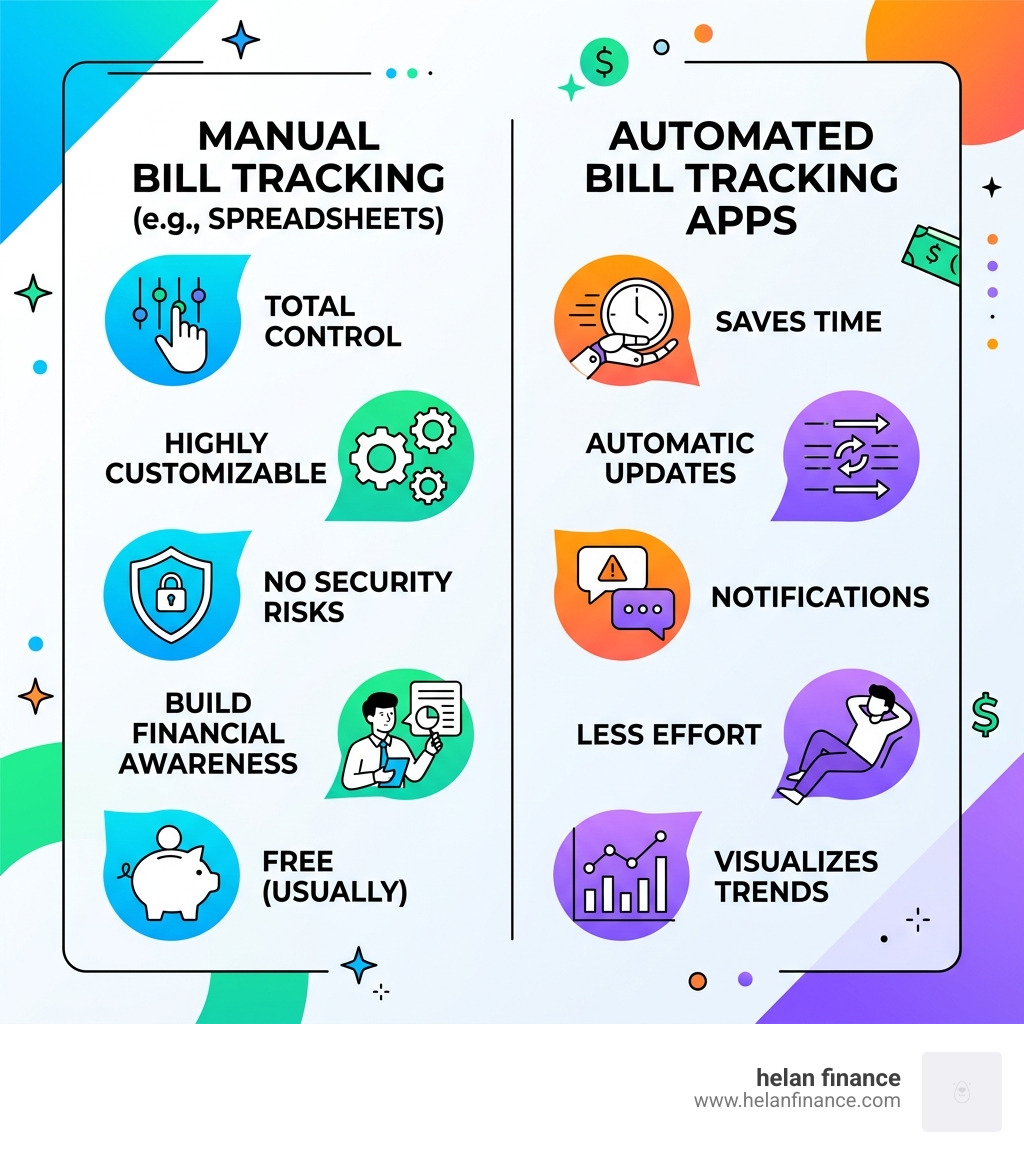
In 2026, the debate between spreadsheets and automated budgeting apps continues. While apps offer convenience, many people are returning to the bill tracker spreadsheet for several reasons.
- Data Ownership: With a spreadsheet, your data stays in your Google Drive or on your hard drive. You aren’t giving a third-party app your bank login credentials.
- Customization: Apps force you into their categories. In a spreadsheet, you can change every single cell, formula, and color.
- No Subscriptions: Most high-quality templates are a one-time purchase or free, whereas many apps now charge $10-$15 per month.
- AI Integration: Tools like Excel’s Copilot now allow you to ask questions like “Which category has increased the most since January?” giving you the power of an app with the privacy of a spreadsheet.
For a deeper dive into the software side, see The Best Ways To Track Expenses Using Apps and The Definitive Guide To Spending Tracker. Interestingly, even professional organizations use these tools; for example, you can see how complex data is managed in this Legislation Tracker – Excel Version – Google Sheets.
Why a Bill Tracker Spreadsheet Beats Automated Apps
We believe manual control is the key to financial health. When an app automatically categorizes a transaction, you might not even notice it. When you have to type “Electric Bill – $145” into your spreadsheet, your brain processes that cost. This awareness naturally leads to better spending habits and formula transparency that apps often hide.
Advanced Strategies for Debt Reduction and Cash Flow
Once you have the basics down, you can use your bill tracker spreadsheet for more advanced financial engineering.
- The Snowball Method: List your debts from smallest balance to largest. As you pay one off, “roll” that payment into the next one. A spreadsheet makes it easy to visualize this momentum.
- Net Worth Integration: Link your bill tracker to a “Net Worth” tab. As your debt balances go down in your tracker, your net worth automatically goes up.
- Scenario Modeling: Use your spreadsheet to ask “What if?” What if you cut dining out by 20%? What if you got a $200/month raise? You can model these scenarios to see how they impact your savings goals.
Customizing Your Bill Tracker Spreadsheet for Households
Managing money as a couple or a household requires extra coordination.
- Shared Access: Use Google Sheets or OneDrive to give your partner access. You can both update the sheet in real-time.
- Real-Time Updates: Use the “@” mention feature in cell comments to ask questions like “@Sam, was this grocery charge for the party?”
- Expense Splitting: Add a column to track who paid for what. At the end of the month, the spreadsheet can calculate exactly who owes who to square up.
Frequently Asked Questions about Bill Tracking
How do I handle irregular or seasonal bills in a spreadsheet?
We recommend creating a “Sinking Fund” or a separate section for these. Total up your annual irregular costs (like car registration or holiday gifts), divide by 12, and treat that “monthly average” as a regular bill. This way, the money is already there when the big bill arrives.
Can I use a bill tracker on my phone or tablet?
Yes! Both Google Sheets and Excel have excellent mobile apps. While it’s easier to do the initial setup on a desktop, checking off a bill as “Paid” while you’re standing in line at the grocery store is a great way to stay on top of things.
Is it better to use Google Sheets or Excel for tracking bills in 2026?
It depends on your priority. If you want to collaborate with a spouse and access your data anywhere, Google Sheets is the winner. If you want advanced AI features (like Copilot) and powerful data visualization for a complex small business, Excel is the gold standard.
Conclusion
At Helan Finance, we believe that financial health isn’t about how much you make—it’s about how well you manage what you have. A bill tracker spreadsheet is more than just a list of numbers; it’s a routine that brings calm and clarity to your daily life. By taking ten minutes a week to engage with your finances, you move from being a passive observer to an active manager of your future.
Ready to take the next step in your financial journey? Explore our more info about financial planning services and let us help you simplify your path to financial freedom.

